SCHEDULED MESSAGES
Managing time-sensitive customer communications from creation to delivery.
ROLE
UI/UX Designer
TOOLS
Figma
WHAT I DESIGNED
-
Interaction Design
-
UI Design
-
Responsive Design
OVERVIEW
National Office employees needed a way to create and schedule informational messages that would appear on the Pay My Loan customer homepage.
I designed the end-to-end experience—from creating and scheduling a message to managing existing messages and displaying the right information to customers at the right time.
DESIGNING THE EXPERIENCE
I approached it as a message lifecycle
Rather than designing the create-message form in isolation, I looked at the entire journey:
Create → Schedule → Active → Edit / Cancel → Expired
This became the foundation for the employee experience.

Creating and scheduling a message
The Create Message experience allows employees to enter the message type, header, body, start date/time, and end date/time.
I kept the form straightforward while providing guidance around the scheduling requirements. Only today or future dates can be entered, and the Save action becomes available once the required information has been completed.

Making errors easier to correct
Because a scheduling mistake could cause customers to see outdated or mistimed information, validation was an important part of the experience.
I designed inline error states that identify the missing or incorrect information and highlight the corresponding fields rather than simply preventing the user from saving.
I also considered situations such as manually entering an invalid date and leaving the page with unsaved changes.

Managing messages over time
Once messages are created, employees need to know what is happening with them.
I designed the Scheduled Messages view around clear message states:
Active · Scheduled · Canceled · Expired
Each state communicates the actions available to the employee. Active and scheduled messages can be edited or canceled, while expired or canceled messages no longer require an action.
The list also includes the message details, creator, start/end dates, status, and pagination for larger sets of messages.

Designing the customer experience
The employee workflow doesn't end when the message is saved.
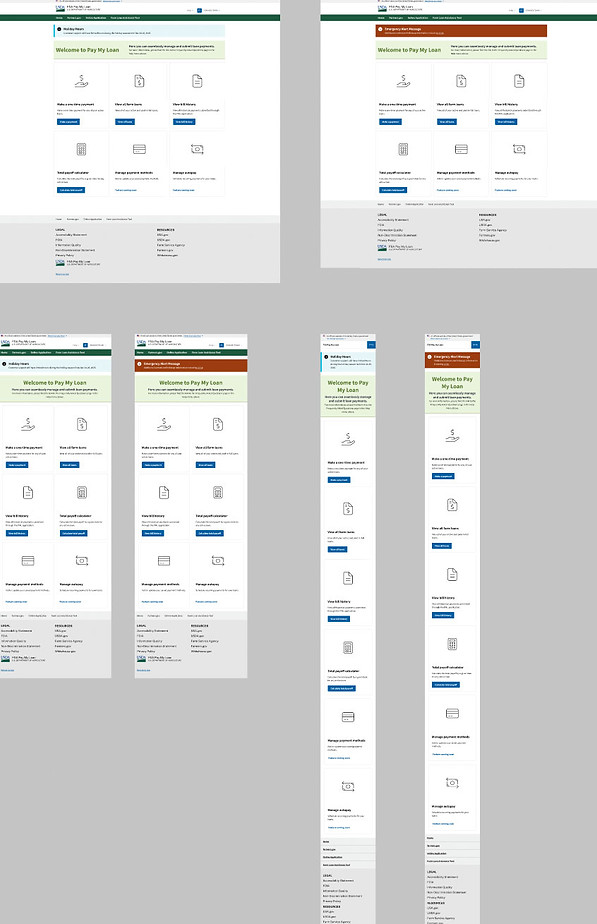
When a message becomes active, it appears on the customer-facing Pay My Loan homepage as an informational message.
The design was carried through desktop and mobile experiences so that customers can see important information without disrupting the primary payment tasks on the page.
OUTCOME
A complete workflow for managing customer communications
Instead of treating the feature as a single form, the design accounted for the full message lifecycle, including validation, editing, cancellation, status, and the final customer-facing experience.
The resulting experience gave authorized employees a clear way to manage time-sensitive communications while keeping the customer experience simple and focused.